Solutions

The symptoms that reveal the need for a scheduling software
Do you recognize yourself in these daily situations? Your priority orders keep piling up delays despite your constant reorganization efforts. You constantly juggle priorities, manually reallocating resources several times a day to try to meet customer commitments. Component shortages regularly block your production even as other parts pile up in your work-in-progress. Your planning meetings drag on without providing clear visibility into the real available capacity.
These symptoms often reveal a mismatch between the complexity of your production environment and the tools used to schedule it. Whether you still use Excel, are trying to leverage your ERP's scheduling modules, or are considering a specialized scheduling software (APS), this guide will help you understand the fundamental differences between these approaches and identify the solution suited to your context.
In this article, we explore the 7 determining criteria for choosing a scheduling software, we objectively compare Excel, ERPs, and specialized APS solutions, and we guide you through the steps of a successful deployment. You will then have everything you need to transform your scheduling from a time-consuming operational constraint into a strategic competitive advantage.
The 7 essential criteria for choosing your scheduling software
1. Finite capacity and multi-constraint management
The first discriminating criterion concerns the system's ability to handle finite-capacity constraints. Unlike infinite-capacity planning (which assumes unlimited resources), finite-capacity scheduling recognizes that your resources are limited and that any additional order necessarily impacts the others.
A high-performing scheduling software must simultaneously manage multiple constraints:
Machine capacities (available hours, production speeds)
Operator skills and availability
Tooling and its changeover times
Availability of raw materials and components
Sequencing constraints (mandatory order between certain operations)
Specific business rules (temperatures, incompressible lead times)
This multi-constraint management radically distinguishes simplistic solutions from scheduling software truly capable of optimizing complex industrial environments.
2. Accounting for components and identifying bottlenecks
Scheduling cannot be disconnected from the reality of supplies. An effective scheduling software must incorporate:
Visibility into component inventory: The ability to automatically check the availability of the components needed before scheduling a work order, thereby avoiding releases doomed to fail.
Multi-level bill-of-materials management: Accounting for the dependencies between finished products, sub-assemblies, and basic components to synchronize the entire manufacturing chain.
Dynamic bottleneck identification: Automatic detection of the constraint resources that limit your overall throughput, making it possible to focus optimization efforts on these critical points.
Bottleneck protection: Automatic generation of buffers in front of constraint resources to guarantee their continuous supply and maximize their productivity.
This dimension distinguishes tactical scheduling software, truly connected to operational realities, from purely theoretical tools.
3. ERP/MES integrations, IT infrastructure, and security
Scheduling does not operate in a vacuum. Integration capabilities are therefore a major criterion:
Connection with the ERP: Automatic import of work orders, bills of materials, and routings, and export of schedules to the ERP. This bidirectionality avoids error-prone manual re-entry.
Interface with the MES: Real-time feedback of production progress, allowing the scheduling software to dynamically adjust its calculations to the reality on the floor.
Technical infrastructure: Cloud or on-premise solution, depending on your security and performance constraints. Modern cloud solutions generally offer faster implementation.
Security and compliance: Security certifications (SOC 2, ISO 27001), access-rights management, change traceability, GDPR compliance.
A scheduling software that integrates seamlessly into your existing IT ecosystem will considerably ease its adoption and maximize its value.
4. Time-to-value, user experience, and shop-floor management
Deployment speed and ergonomics largely determine the success of a scheduling project:
Time-to-value: The time between the investment decision and obtaining the first operational benefits. Modern scheduling software aims for deployments in 4 to 12 weeks versus 6 to 18 months for legacy solutions.
User experience (UX): An intuitive visual interface (interactive Gantt charts), quick learning, easy manipulation (drag-and-drop). Poor UX leads to rejection by users.
Communication with the shop floor: The ability to display priorities directly to operators via screens, tablets, or dedicated terminals. This communication loop turns the best theoretical schedule into operational reality.
Mobility: Access from tablets or smartphones for supervisors and team leaders who spend their time on the floor.
The most sophisticated scheduling software remains useless if it is not adopted by the teams. UX is therefore not a luxury but an imperative.
5. Data governance, scenarios, and ROI measurement
The quality of scheduling depends directly on the quality of the data that feeds it:
Data-quality management: Validation mechanisms, anomaly detection, correction suggestions. A scheduling software must help identify and correct erroneous data (aberrant standard times, inconsistent routings).
Scenario simulation: The ability to quickly test the impact of decisions (accepting an urgent order, acquiring equipment, recruiting operators) before actually applying them.
Dashboards and KPIs: Visualization of performance (service level, load rate, plan adherence) to drive continuous improvement.
ROI measurement: The ability to quantify the gains obtained (reduced lead times, increased productivity, improved service level) to justify the investment.
This analytical dimension transforms the scheduling software from an operational tool into a strategic performance lever.
6. Algorithmic optimization capabilities
Beyond simple visualization, a high-performing scheduling software must actively optimize:
Optimization algorithms: The ability to automatically explore thousands of combinations to identify the optimal sequences according to your criteria (minimizing delays, maximizing throughput, reducing work-in-progress).
Multi-objective optimization: Simultaneous management of sometimes contradictory objectives (productivity vs. quality vs. lead times) with the ability to define weightings.
Dynamic rescheduling: Automatic recalculation in the face of disruptions (breakdowns, absences, emergencies) while minimizing disturbances to the existing schedule.
Computation time: Solutions capable of computing optimized schedules in a few seconds even for complex environments (hundreds of orders, dozens of resources).
These capabilities radically distinguish truly intelligent scheduling software from simple visualization tools.
7. Sector adaptability and support
Finally, the fit with the specifics of your sector determines the relevance of the solution:
Sector expertise: Knowledge of the specific constraints of your industry (aerospace traceability, food-industry use-by dates, rare watchmaking skills).
Configurability: The ability to configure the scheduling software to reflect your business rules without heavy IT development.
Support and guidance: The quality of the initial training, the responsiveness of technical support, and guidance in continuous improvement.
Community and ecosystem: The existence of a user base sharing best practices and feedback.
A generic scheduling software will require costly adaptations where a specialized solution will deliver immediate value.
Quick comparison: Excel vs. ERP module vs. scheduling software
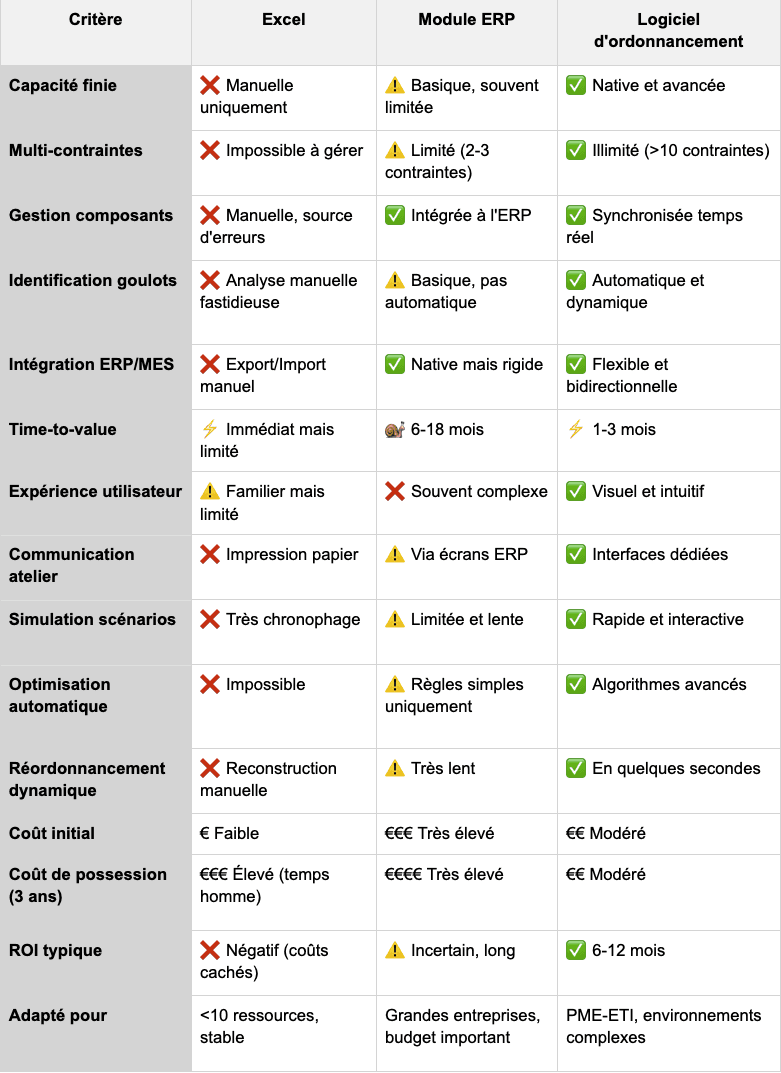
To clarify the fundamental differences between these approaches, here is a comparison matrix across the critical dimensions:
Detailed analysis by solution
Excel: Appropriate only for extremely simple environments (<10 resources, low variability). Beyond that, the hidden costs (planning time, errors, delays) quickly exceed the cost of a professional solution.
ERP modules: Designed for strategic planning (MRP, MPS) but generally unsuited to fine tactical scheduling. Their complexity of use and prohibitive computation times limit their adoption for day-to-day scheduling.
APS scheduling software: Specialized solutions offering the best balance between functional power, deployment speed, and user adoption. Particularly relevant for multi-constraint environments requiring responsiveness and optimization.
Deployment steps and change management
Deploying a scheduling software generally follows a proven 4-phase methodology:
Phase 1: Scoping and preparation (2-3 weeks)
Precise definition of the scope (resources, products, horizon)
Identification of the critical constraints and business rules
Audit of the quality of the existing data
Building the project team and defining the roles
Detailed deployment planning
Phase 2: Configuration and setup (3-4 weeks)
Import and validation of the data (resources, routings, bills of materials)
Setting up the scheduling software according to your rules
Configuration of the ERP/MES integrations
Functional tests and validation of the algorithms
Iterative adjustments based on user feedback
Phase 3: Training and pilot (2-3 weeks)
Training of planners and supervisors
Pilot start-up on a limited scope
Running in parallel with the existing methods
Collecting feedback and fine adjustments
Validation of the measurable benefits
Phase 4: Rollout and optimization (2-3 weeks)
Gradual extension to the entire scope
Retiring the old tools
Training of the shop-floor teams
Setting up continuous-improvement processes
Measuring and communicating the gains obtained
A typical deployment therefore spans 8 to 12 weeks, with operational benefits visible as early as the pilot phase. This speed contrasts sharply with traditional ERP projects, often measured in quarters or even years.
Best practices for evaluating and selecting your solution
Run a targeted POC (Proof of Concept)
Rather than a theoretical evaluation based solely on generic demos, favor a POC on your real data:
Provide a representative sample of your data (routings, resources, orders)
Ask the vendor to configure their scheduling software on this concrete case
Evaluate the results obtained (generated schedule, computation time, ease of use)
Involve your future users in this evaluation
This pragmatic approach quickly reveals the gaps between sales promises and real capabilities.
Define measurable success criteria
Establish upfront the metrics that will define the success of the project:
Reduction in planning time (target: -60 to -75%)
Improvement in the customer service level (target: +15 to +25 points)
Increase in the utilization rate of critical resources (target: +10 to +20 points)
Reduction in production work-in-progress (target: -20 to -40%)
These criteria will guide not only the selection but also the measurement of post-deployment ROI.
Organize a collaborative "bottlenecks" workshop
Bring together planners, supervisors, and experienced operators to:
Collectively identify the constraint resources of your system
List the recurring dysfunctions of the current scheduling
Define the prioritization rules the scheduling software must respect
Gather the specific expectations of each function
This co-construction fosters future ownership of the solution and ensures it fits the real needs.
Evaluate the partner beyond the tool
The quality of the vendor matters as much as that of the software:
Financial strength and longevity of the company
Customer references in your sector of activity
Perceived quality of technical support (response time, competence)
Frequency of updates and product roadmap
Ease of contact with the leadership team
An excellent but poorly supported scheduling software will generate more frustration than an average tool with good support.
Conclusion: Turn your scheduling into a competitive advantage
Choosing a scheduling software is a strategic decision that will durably impact your operational performance. As we have shown, the differences between Excel, ERP modules, and specialized APS solutions are fundamental, both in functional capabilities and in operational benefits.
The 7 criteria presented - finite multi-constraint capacity, component and bottleneck management, IT integrations, time-to-value, data governance, algorithmic optimization, and sector adaptability - give you a structured framework to objectively evaluate the solutions on the market.
Our comparative analysis reveals that specialized APS scheduling software, like Oplit, offers the best balance between functional power, deployment speed, and return on investment. They bridge the gap between the deceptive simplicity of Excel (unsuitable as soon as complexity increases) and the heaviness of ERP modules (designed for other purposes).
Companies that take this step typically see:
A 60 to 75% reduction in the time spent on scheduling
A 15 to 25% improvement in the customer service level
A 10 to 20% increase in the utilization of critical resources
An ROI achieved in 6 to 12 months
These benefits are not a matter of chance but the direct consequence of an informed choice and a methodical deployment.
Ready to see concretely what a modern scheduling software can bring to your company?
🎯 Request a personalized Oplit demo on your real data to immediately visualize the potential impact on your scheduling.