Solutions
1. Selection criteria
2. Methodology and time required for implementation
3. The 5 golden rules for a successful rollout
Conclusion
In today's industrial landscape, competitiveness rests largely on the efficiency of production processes. A high-performing scheduling software then becomes an essential asset for optimizing operations, reducing costs, and improving delivery times. However, faced with the multitude of solutions available on the market, how do you select the one that will best meet the specific needs of your workshop or plant? This article guides you through the essential criteria to consider in order to make an informed choice.
1. Meeting functional needs
Before embarking on the selection of a scheduling software, it is crucial to understand in depth the specific needs of your company.
a. Map out and document the current process
Start by analyzing your current planning and scheduling practices. Identify the assumptions on which your daily decisions rest and the features that follow from them. Where are the analyses carried out (Excel, whiteboard, Power BI, etc.)? Which assumptions do you need to take into account? On what criteria do you make your decisions (lead times, costs, available resources)?
b. Identify the operational issues
List the challenges encountered in your daily operations. This may include frequent delays, poor resource allocation, bottlenecks, or ineffective communication between departments. This step makes it possible to target the essential features for overcoming these obstacles.
c. Consolidate and prioritize the needs
From the information gathered, draw up an exhaustive list of functional needs. It is essential to rank them by priority, distinguishing the must-have features from those that are merely desirable. This prioritization will make it easier to choose the most suitable software.
2. Features expected of a scheduling software
An effective scheduling software must offer a set of key features to optimize production management.
a. Finite-capacity planning of bottleneck workstations
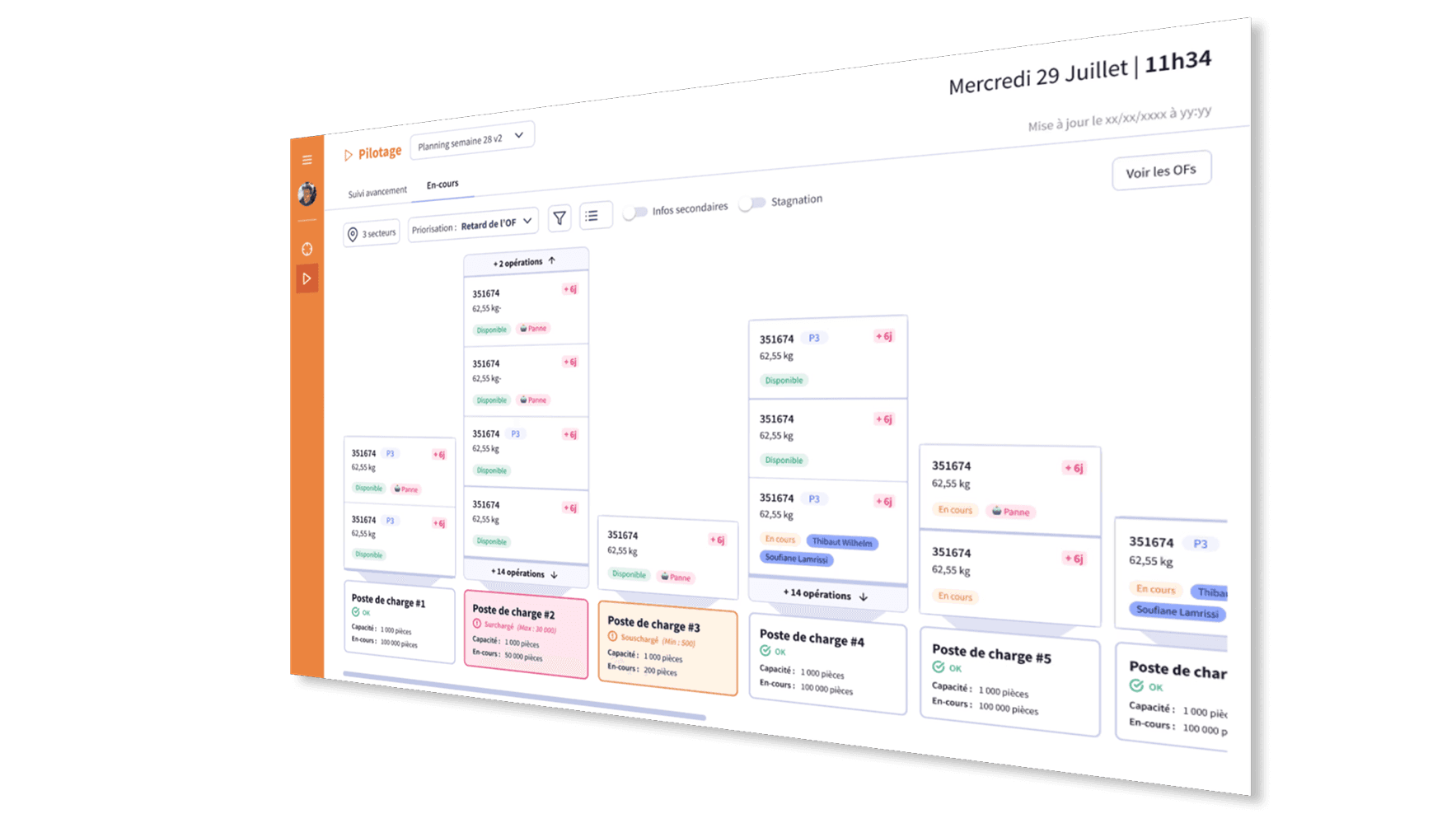
Finite-capacity planning makes it possible to account for the real limitations of critical resources, thereby avoiding overload and delays. This approach ensures optimal use of the bottleneck workstations, i.e. the steps in the process likely to limit the production flow.
b. Accounting for format-changeover times
Setup times, or format-changeover times, can significantly impact productivity. A good software must incorporate these durations to effectively plan the transitions between different production runs, thereby minimizing downtime.
c. Managing the availability of tooling and operator skills
The availability of specific equipment and qualified operators is crucial. The software must make it possible to check in real time the availability of the necessary tooling and the competent personnel for each task, thereby guaranteeing realistic and achievable planning.
d. Projecting component and raw-material stocks
Anticipating material needs is essential to avoid stockouts or overstock. The software must offer visibility into current and future stock levels, incorporating replenishment lead times and consumption forecasts.
e. Prioritizing queues and work orders (WOs)
In an environment where several work orders are waiting, the software must help determine which ones to process first, based on criteria such as delivery dates, customer importance, or resource availability.
f. Clear communication of the schedule to operators
Once the schedule is established, it is crucial that the shop-floor operators have a clear understanding of it. The software must provide intuitive interfaces, displaying the assigned tasks, the deadlines, and the specific instructions, thereby facilitating unambiguous execution.
g. Real-time tracking of WO position and forecasting of finish dates
Real-time tracking makes it possible to know exactly where each work order stands in the process. This feature offers visibility into progress and helps anticipate delivery times, allowing proactive adjustments if necessary.
h. Visualizing plan progress on the bottleneck workstations
Since bottleneck workstations are critical to the production flow, it is essential to monitor their performance closely. The software must provide visualization tools showing the current state and progress of tasks at these workstations, helping to quickly identify delays or inefficiencies.
3. Associated costs
The choice between a SaaS (Software as a Service) solution and an on-premise installation has distinct financial and operational implications.
a. SaaS model
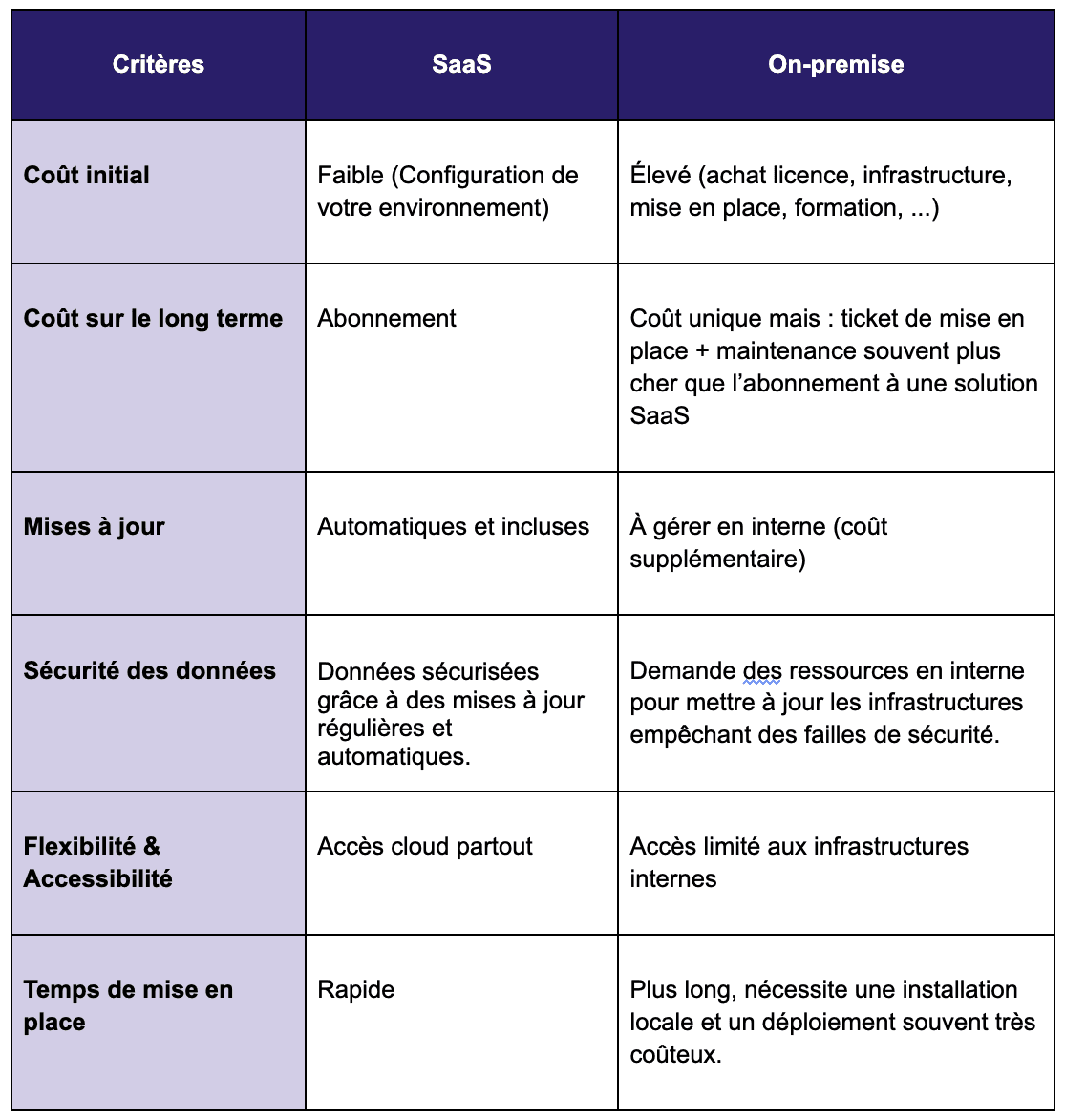
SaaS solutions are hosted in the cloud and accessed via the internet. They generally operate on a monthly or annual subscription model.
Advantages:
Reduced initial costs: No need to invest in costly hardware infrastructure.
Automatic updates: Vendors manage the updates, ensuring the software is always up to date.
Accessibility: Access possible from anywhere with an internet connection.
Drawbacks:
Vendor dependence: Performance and availability depend on the provider.
Recurring costs: Over the long term, subscriptions can exceed the cost of an on-premise solution.
b. On-premise model
Unlike SaaS solutions, on-premise software is installed directly on the company's servers and managed in-house.
Advantages:
Full control: All data and operations remain in-house, which can be an asset for companies concerned about confidentiality.
Advanced customization: On-premise software often offers greater flexibility to adapt to the company's specific needs.
Controlled long-term spending: After the initial investment, costs are limited to maintenance and internal updates.
Drawbacks:
Very high initial investment : Purchasing the licenses, installation, and setting up the infrastructure can represent a significant cost.
Maintenance is the company's responsibility: Unlike SaaS, all updates, patches, and evolutions must be managed in-house.
Less flexibility: Remote access and scalability are often more complex to manage.
c. SaaS vs. on-premise comparison
💡 Note: According to a Gartner study, by 2026 at least 80% of manufacturing companies will have adopted cloud-based business applications, owing to the real-time centralization of data, an intuitive and customizable interface, and seamless integration with other solutions, enabling optimized management of operational flows. (source)
Once the solution is selected, it is essential to plan its deployment carefully in order to maximize its benefits and ensure quick adoption by the teams.
a. Team involvement
The implementation of a scheduling software varies depending on the complexity of the chosen solution and the company's organization.
⏳ Average implementation time:
SaaS: 1 to 3 months (configuration, integration, training)
On-premise: 6 to 12 months (installation, specific development, training, maintenance)
👨💼 Team involvement:
Executives and management: define the objectives and track the project's progress.
Production managers: adapt the processes according to the new features.
Operators: be trained on the tool and adopt it in their daily work.
b. Interconnection with other software
A scheduling software does not work in a silo: it must integrate with the company's other management tools to ensure smooth data communication.
🔗 Main software to interface with:
ERP (e.g. SAP, Oracle, Microsoft Dynamics): to retrieve the work orders and send back the progress statuses.
MES (Manufacturing Execution System): for real-time tracking of shop-floor operations.
WMS (Warehouse Management System): to manage the supply of raw materials and components.
Once the solution is chosen, here are 5 essential rules to guarantee its success:
1️⃣ Involve the shop floor from day one: Operators and shop-floor managers must be consulted as early as the selection phase to ensure good alignment with the real needs.
2️⃣ Sponsor commitment: A project without strong support from management has little chance of succeeding. Weekly monitoring is recommended.
3️⃣ Move forward in stages and iterate: A progressive approach makes it possible to integrate the software without disrupting production. Test, adjust, improve.
4️⃣ Prioritize, prioritize, prioritize: Always focus on the features that will have the greatest impact on productivity before adding secondary options.
5️⃣ Follow a precise schedule: Define clear milestones and stick to the implementation timeline to avoid overruns.
Choosing a scheduling software is a strategic step for any industrial company wishing to optimize its production, reduce its costs, and improve its responsiveness to the unexpected.
📌 Key points to remember:
✅ Analyze your needs and prioritize the essential features.
✅ Compare the SaaS and on-premise models according to your budget and technical constraints.
✅ Anticipate integration with your other management tools (ERP, MES, WMS).
✅ Prepare a rigorous implementation plan with strong involvement from the field teams.
✅ Follow the 5 golden rules for a successful adoption.