Solutions
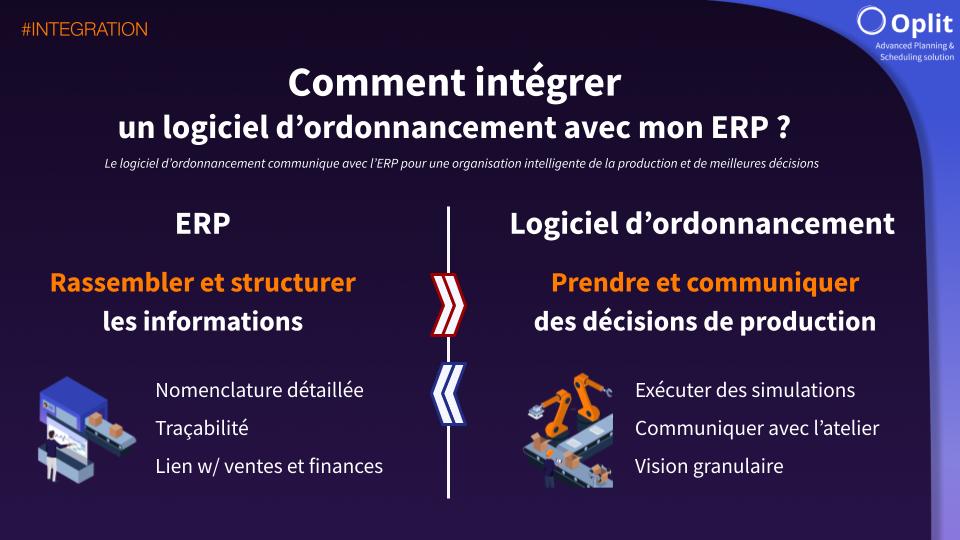
In the digital ecosystem of manufacturing companies, two technological pillars coexist and must work in perfect harmony: the ERP (Enterprise Resource Planning) and the scheduling software. Although complementary, these systems meet distinct needs and occupy very specific roles in the digital value chain. The ERP establishes itself as the guardian of data and the sanctuary of the company's information, centralizing all the administrative, commercial, and financial processes. In parallel, the scheduling software positions itself as the tactical tool for optimizing production and communicating with the shop floor, facilitating day-to-day operational decision-making. The ERP–scheduling-software connection is therefore a major strategic issue for any industrial company wishing to maximize its production performance while maintaining the integrity of its data. This practical guide invites you to explore the workings of a successful integration, analyzing the key data to synchronize, the technical methods of interconnection, and the best practices for establishing a lasting symbiosis between these two critical systems.
1. Redefining the role of each system
The ERP: a sanctuary of information
The ERP sits at the heart of the company's information system and plays the role of the official repository of data. This centralization offers several advantages:
Ensuring the uniqueness and consistency of data
Global management of financial, commercial, and logistics aspects
Full traceability of operations and transactions
Consolidation of information for management reporting
With a view to an effective ERP–scheduling-software connection, it is essential to understand that the ERP must remain the single source of truth for strategic data, such as customer orders, product bills of materials, or the theoretical capacities of resources.
The scheduling software: optimization and shop-floor communication
Complementing the ERP, the scheduling software meets specific operational objectives:
Fine optimization of production sequences
Quick adaptation to shop-floor disruptions (breakdowns, absences, delays)
Simulation of production scenarios
Visual and tactical communication with the operational teams
A symbiotic collaboration
The symbiosis between the ERP and the scheduling software takes shape through bidirectional, continuous information flows. The ERP feeds the scheduling system with the structural data and the objectives to be reached, while the scheduling software returns planned dates for the production operations and work orders in line with the plant's capacity constraints and its strategic priorities (revenue, OTD, production lead time).
This dynamic relationship makes it possible to constantly align strategic planning (long horizons) with operational constraints (short term), thereby creating a virtuous circle of continuous improvement. The ERP–scheduling-software connection then becomes the foundation of strengthened industrial agility.
2. Which data should be integrated between the ERP and the scheduling software?
The relevance of an ERP–scheduling-software connection rests on the precise identification of the data to synchronize.
2.1 From the ERP to the scheduling software
The list of work orders (WOs) to produce
Work orders are the raw material of any scheduling system, defining the "what" and the "when" of production. In a SAP environment, this information is generally accessible via the COOIS table, which centralizes all the planned production orders (source: SAP Documentation, "COOIS: Production Orders Information System," 2023).
The key elements to integrate include:
Work-order reference
Product concerned and quantity
Earliest start date
Desired finish date
Customer or commercial priority
Work-order status (planned, released, in progress, completed)
The regular synchronization of this data guarantees that the scheduling software always works on the basis of up-to-date priorities, a fundamental aspect in a make-to-order context.
Completed operations and production progress
To maintain consistency between planning and execution, it is crucial to integrate the actual-completion data coming from the shop floor. This information is generally collected via production-tracking, time-clocking, or industrial-IoT systems.
The essential data to retrieve includes:
Actual start and end of operations
Quantities produced (good parts and rejects)
Setup and run times
Resources used
Reasons for stoppages and incidents
This feedback allows the scheduling software to adjust its forecasts in real time, while feeding the ERP with the data needed for invoicing, cost tracking, and performance analysis.
Stock levels of finished and semi-finished products
The availability of materials and components is a major constraint for scheduling. Integrating stock levels in real time makes it possible to avoid planning operations that cannot be carried out for lack of available components.
The stock information to synchronize includes:
Current stock levels by reference
Storage locations
Lots and traceability
Existing reservations
Supply forecasts
This visibility into stock allows the scheduling software to incorporate supply constraints into its calculations, thereby avoiding production releases doomed to fail for lack of material.
Other relevant data
Depending on the specific industrial context, other data can enrich the ERP–scheduling-software connection:
Capacities and skills of the human resources
Work calendars and schedules
Planned preventive maintenance
Required qualifications and certifications
Regulatory or quality constraints
Integrating this complementary information makes it possible to refine the relevance of the scheduling and to guarantee its operational feasibility.
2.2 From the scheduling software to the ERP
One of the main benefits of a smooth integration between a scheduling software and an ERP lies in the synchronization of planning updates. Once the work orders (WOs) and operations (OPs) have been processed and optimized by the scheduling software, it is crucial to feed the new planned and actual dates back into the ERP.
Why is this update essential?
Aligning production timelines with the reality on the ground: The ERP, as the central repository, must reflect the updated finish dates to ensure the consistency of the commitments made to customers and logistics.
Making performance indicators reliable: Updating the actual finish dates makes it possible to adjust the calculation of the service level (OTD - On Time Delivery), to analyze the gaps between forecast and actual, and to identify the causes of delay in order to improve future processes.
Optimizing stock and resource management: When the finish dates of work orders and operations are synchronized, the information on the availability of finished products and components is updated in real time in the ERP, thereby avoiding stockouts or bottlenecks.
3. How do you carry out the integration technically?
The technical implementation of an ERP–scheduling-software connection can follow different approaches, each with its advantages and drawbacks. The choice of method will mainly depend on the company's digital maturity, its IT resources, and its real-time constraints.
Flat-file integration
The simplest approach consists of setting up structured file exchanges (CSV, XML, JSON) between the ERP and the scheduling software. This method offers the advantage of simplicity and robustness.
Typical process:
Scheduled export of data from the ERP
Drop of the files into a shared directory
Import of the data into the scheduling software
Export of the scheduling results
Import of the completion data into the ERP
This approach is particularly suited to environments where scheduling decisions can accommodate a periodic refresh of the data (daily or per shift).
Advantages:
Simplicity of implementation
Low development cost
Possibility of manual validation of the exchanges
Robustness in the face of temporary outages
Limitations:
No real-time synchronization
Risk of errors during manual handling
Delay between the availability of the data and its use
APIs with batch file sharing
A more sophisticated approach consists of automating the exchanges via application programming interfaces (APIs) that trigger batch file transfers. This method keeps the robustness of files while reducing human intervention.
Typical process:
Scheduled call of the API by the ERP or an orchestrator
Automatic generation of the exchange files
Automatic triggering of the imports
Technical validation of the transfers
Advantages:
Automation of the exchanges
Traceability of the transfers
Customizable synchronization frequency
Progressive implementation
Limitations:
Persistence of a time lag
Complexity of error handling
Dependence on system availability during the batch windows
API with event-based communication
The most advanced solution rests on an event-driven architecture, where each significant change in one system automatically triggers an update in the other. This approach is essential to achieve near-real-time synchronization.
Typical process:
Detection of an event in the ERP (new work order, priority change, etc.)
Immediate triggering of an API call
Instant update in the scheduling software
Automatic recalculation of the production sequences
Notification to the operators concerned
Advantages:
Maximum responsiveness to changes
Permanent consistency between the systems
Immediate visibility of the impacts of a decision
Support for true industrial agility
Limitations:
Increased technical complexity
Need for robust infrastructure
Risk of overload in the event of multiple events
Higher development and maintenance cost
Choosing an architecture suited to the context
The selection of the integration method must rely on an in-depth analysis of the company's real needs:
For stable environments with long production cycles, the file-based approach may be sufficient
In mixed contexts, combining planned production and emergencies, the batch-API approach offers a good balance
For industries requiring maximum responsiveness (small batches, highly changing environment), event-based communication becomes essential
4. Best practices for a successful integration
The implementation of a high-performing ERP–scheduling-software connection is not limited to the technical aspects. Several organizational and methodological best practices contribute to the success of the project.
Clearly define the scope of each system
The first step is to establish a precise mapping of each system's responsibilities. This delineation avoids redundancies and conflicts when managing the data.
Typical scope of the ERP:
Management of customer orders
Purchasing and supplies
Accounting and finance
Stock management (reference data)
Definition of bills of materials and routings
Typical scope of the scheduling software:
Optimized sequencing of operations
Detailed resource allocation
Management of operational constraints
Simulation and optimization
Communication with the shop floor
This delineation must be the subject of a consensus within the company and be formalized in a reference document.
Set up data governance
Clear data governance is the foundation of a lasting ERP–scheduling-software connection. It involves defining:
The master system for each type of data
The frequencies and methods of synchronization
The validation and control procedures
The responsibilities in the event of a discrepancy or conflict
This governance must be accompanied by quality indicators that make it possible to measure the reliability of the exchanges and to quickly identify anomalies.
Plan for backup procedures
Despite all precautions, interruptions can occur in the ERP–scheduling-software connection. It is therefore crucial to plan for fallback procedures that make it possible to ensure the continuity of operations:
Manual backup exports/imports
Data-reconciliation procedures after an incident
Temporary standalone modes for each system
Prioritization of the critical data to synchronize in degraded mode
These procedures must be documented, tested regularly, and known to the operational teams.
Train users on the specifics of the integration
The human dimension remains fundamental to the success of an ERP–scheduling-software connection. Users must understand:
The origin of the data they handle
The impact of their actions on the other system
The propagation delays of changes
The limits of automation
5. The benefits of a successful integration with Oplit
To concretely illustrate the principles discussed, let's examine the tangible benefits observed by customers who have implemented an ERP–scheduling-software connection with the Oplit solution.
Measurable results
Customers who have integrated Oplit have seen significant improvements in several key areas:
Operational performance
Control the shop-floor work-in-progress level and better communicate priorities at each workstation
Communicate reliable lead times to customers
Anticipate the critical resources by trade according to the production load of the coming months
Optimize resource use and load allocation thanks to reactive scheduling and one-click simulations
Increase customer confidence thanks to load-capacity audits based on a robust solution
> See more details in our dedicated “Top 5 use cases” article <
Impact:
- 20% production lead time @Watchmaking
- 6 hrs saved per person @Packaging
- 50% number of delays @Jewelry
+ 5% production capacity @Aerospace
Conclusion
The integration between an ERP and a scheduling software represents much more than a simple technical project: it is an organizational transformation aimed at establishing a true symbiosis between strategic vision and operational execution. The ERP–scheduling-software connection thus constitutes the central nervous system of a more agile, more responsive, and ultimately more competitive industry.
The success of such a project rests on three fundamental pillars:
A clear, shared definition of the role of each system
The choice of an integration architecture suited to the company's specific context
The setting up of rigorous governance of the data and processes
The companies that manage to establish this digital symbiosis see tangible benefits: reduced lead times, an improved service level, optimized resources and, ultimately, a strengthening of their competitive advantage.
In an economic environment where agility is becoming a survival factor, implementing a high-performing ERP–scheduling-software connection is no longer an option, but a strategic necessity. Industrial companies must, however, approach this process methodically, relying on proven expertise and solutions adapted to their sector specifics.
Like any journey, that of integration begins with a first step: the clear-eyed analysis of the current digital maturity and the definition of a realistic target vision. Only under this condition can the transformation generate the expected value, combining the strategic excellence of the ERP with the operational agility of the scheduling software.